
Topology refers to the shape of a network. The way different nodes in a network are connected to each other and the way they communicate with each other are determined by the network’s topology. The choice of topology is dependent upon on two factors.
1) The type and the number of equipment being used
2) Cost
The various Computer networks topologies and their working are given below.
- Mesh
- Star
- Ring
- Bus
- Hybrid
a) Mesh Topology :
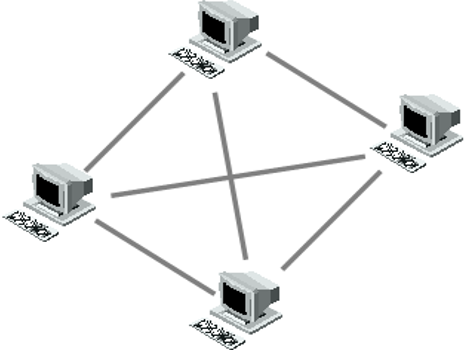
In a mesh topology, each device/PC is connected to every other device/PC in the network by its own dedicated cable. A network with ‘n’ nodes, will need n(n-1)/2 links to connect form a mesh topology. The below figure has 4 nodes, which means it will require 6 dedicated links to form a mesh topology.
Advantages of this topology :
- Mesh topology boasts the highest fault tolerance of all of the network topologies as data is transferred among the devices through dedicated channels or links.
- More security and privacy
Disadvantages of this topology :
- Installation and configuration are difficult.
- Since each connection needs its own cable a Mesh topology can get very expensive.
- Cost of maintenance is high.
b) Star Topology :
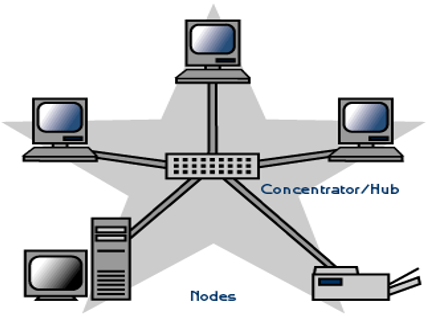
A physical Star topology connects the devices via a centralized unit such as a Hub or Switch. Nodes communicate across the network by passing data through this central device/unit.
Advantages of star topology :
- Single computer failure doesn’t bring down the whole network.
- Adding new devices to a Star network is very simple compared to in any other topologies.
- When connecting or removing devices, no disruptions occur.
- Centralised network/hub monitoring
- Easy to troubleshoot
Disadvantages of this topology :
- If the central device fails, then the whole network fails.
- Compared to the bus topology, a star network generally requires more cable.
- Star topology is more expensive than linear bus topologies because the cost of the central device is high.
c) Bus Topology :
In Bus topology, all devices are connected to a central cable, called the bus or backbone. Both ends of the network must be terminated with a terminator. A barrel connector can be used to extend the network. The backbone functions as a shared communication medium. Device wanting to communicate with another device on the network sends a message onto the backbone. The message is heard by all stations, but only the intended recipient actually accepts and processes the message. Terminator absorbs frames at end of medium

Example:
In the below example, Station C want to transmit a frame of data to station A.

Advantages of this topology :
- Simple, easy to use and construct
- Requires least amount of cable (less expensive)
Problems with this topology :
- A faulty cable will take the entire LAN down
- Difficult to troubleshoot
- Heavy network traffic can slow bus considerably
d) Ring Topology :
In this topology, all devices are connected to one another in the shape of a closed loop, so that each device is connected directly to two other devices, one on either side of it. Data is passed one way from device to device. A short message (called a token) is circulated around the ring, being passed from station to station. The token originates from a controller or master station which inserts it into the ring. A station which wants to transmit waits for the token to arrive. When the token arrives, the station changes it from a token to a connector message and appends its message. This new message is then placed on the outgoing side of the ring.
Each station passes on received tokens if they have nothing to transmit. They monitor connector messages to see if the message is addressed to them. If connector messages are addressed to them, they copy the message, modify it to signify its receipt, then send it on around the ring. Connector messages which are not addressed to them are passed directly on to the next station in the ring. When the connector message travels full circle and arrives at the original sending station, it checks the message to see if it’s been received. It then discards the message and replaces it with a token.

Advantages of this topology :
- Equal access for all users
- Perform well under heavy traffic
Disadvantages with this topology :
- If one device/cable fails then the whole network goes down.
- Difficult to troubleshoot
e) Hybrid Topology :
Hybrid means that there is more than one topology exist
Example: Stared Bus where groups of star-configured networks are connected to a linear bus backbone.

Advantages of this topology:
- Network expansion is simple
Disadvantages of this topology:
- If hub fails connections between the failed hub and other hubs will also fail.
